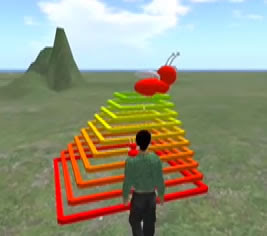
You may have noticed at the end of the S4
SL video, I show the bug creating a colorful stairway (shown on the right). Or maybe you've tried to use the "pen" blocks and can't get them to work. The secret is having a special object called
lineSegment (more info on acquiring one is at the end of this post)
Basically, the pen blocks allow you to make your object leave a trail behind it as it moves. In this way you can make 3D drawings and sculptures using S4
SL. Just drag the
lineSegment object into the inventory of your object. Now if you put the "pen down" block in your script, any time after that when you use a "move" block, it will leave a trail.
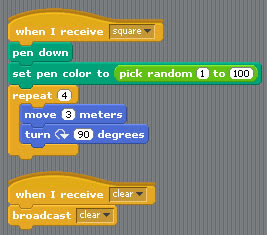
Here's a simple example you can try out- when you say "square," it draws a square in a random color. Type "clear" to clean up the lines (the "clear" block does not work in alpha v0.1 due to a bug- instead you need to use "broadcast clear").
For the code for the stairs example shown above, you can look in the "pet bug" project that comes with S4
SL.
Getting a lineSegment
It appears that our in-world locations for picking up a line segment are now gone, so I'm going to provide instructions for advanced users to create their own versions of it, and hopefully provide them to others. Basically, it is a small cube-shaped prim with some
LSL in it. To make one:
- create a cube shaped prim, 0.1m on all sides
- color it white
- grab the LSL code for it from here
- create a new script and paste in that code
- test it using the methods described above
- set permissions so other users can take a copy
- leave it somewhere, and provide a SLURL here
Good luck! Also, since you read this far, here is a
sneaky little tip. The special code in lineSegment enables the line segments that are left behind to be resized to the correct length and colored according to the code in the parent object programmed wih S4SL... if you don't care about the resizing and coloring, you can just put any object into the inventory of your S4SL-programmed creation, name it lineSegment, and it will get rezzed as it moves (just use the pen down block first). Just be careful not to clutter everything up with rezzing... Enjoy!


 Posts
Posts


